For people who run training and people who train

One place for the whole workout: from schedule to progress

The trainer plans, the client trains, both sides see the same progress.

Used by Without Gravity Szczecin

Panel preview Desktop + mobile
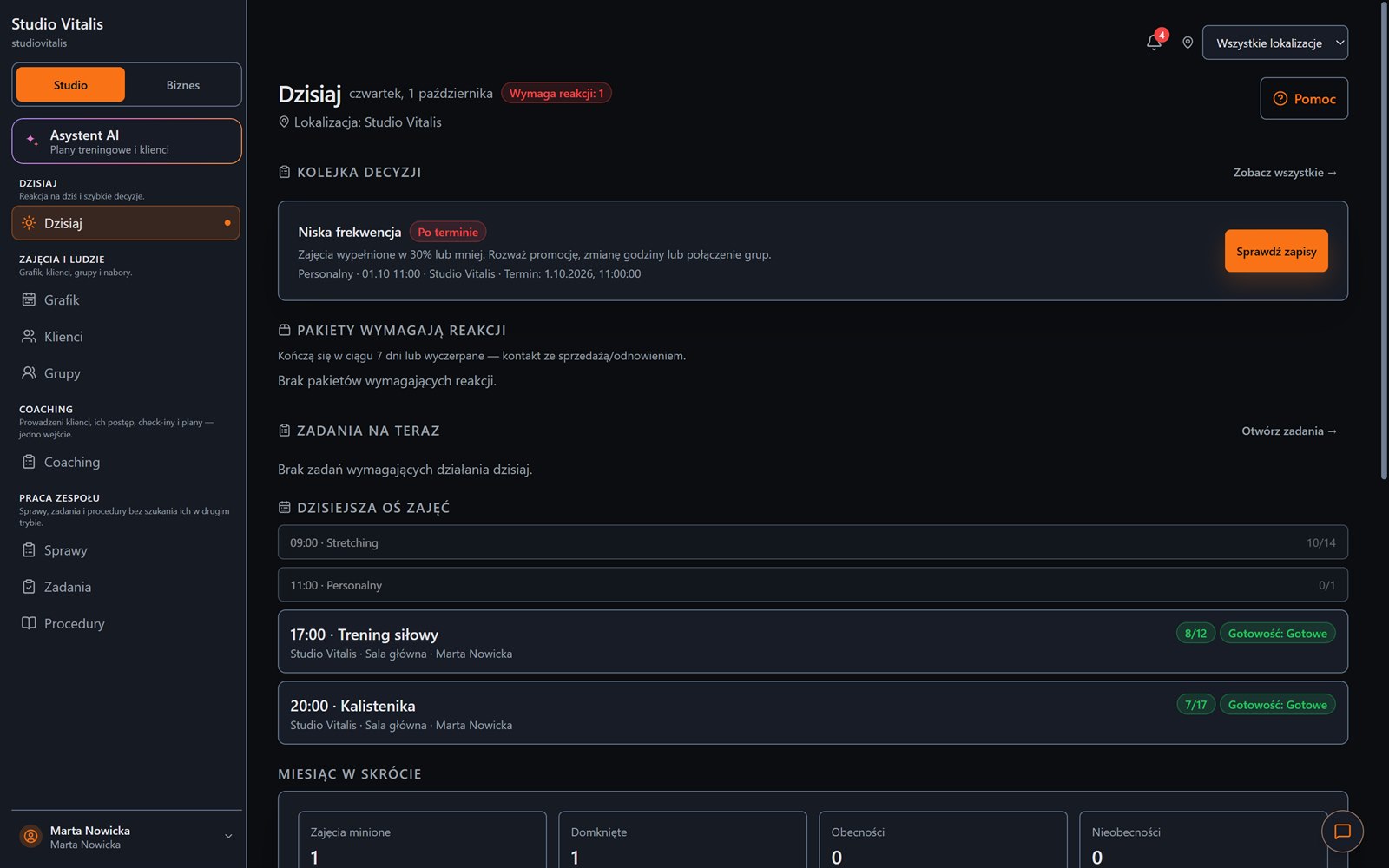
The Today view in Create Progress Studio: the decision queue and the day's class timeline

Who it's for

Pick your side of training

Do you run a room, coach clients or train on your own? We show what matters to you. Everyone works on the same data.
Schedule, passes and money under control

  • A schedule that checks rooms and trainersYou see a clash before your client does.
  • Passes, visit balance and receivablesAll in one client history.
  • Pulse: who is fading before they stop payingA short list of people to ask.
The Today view in the organiser panel: a decision queue and the day's timeline

Every client's plan in one place

  • Plans from the exercise libraryYou build them once and assign them to clients.
  • Execution and client notes come back to youYou know whether the workout happened and how it went.
  • A plan from PDF or Word as a draftYou edit and approve it yourself. Beta
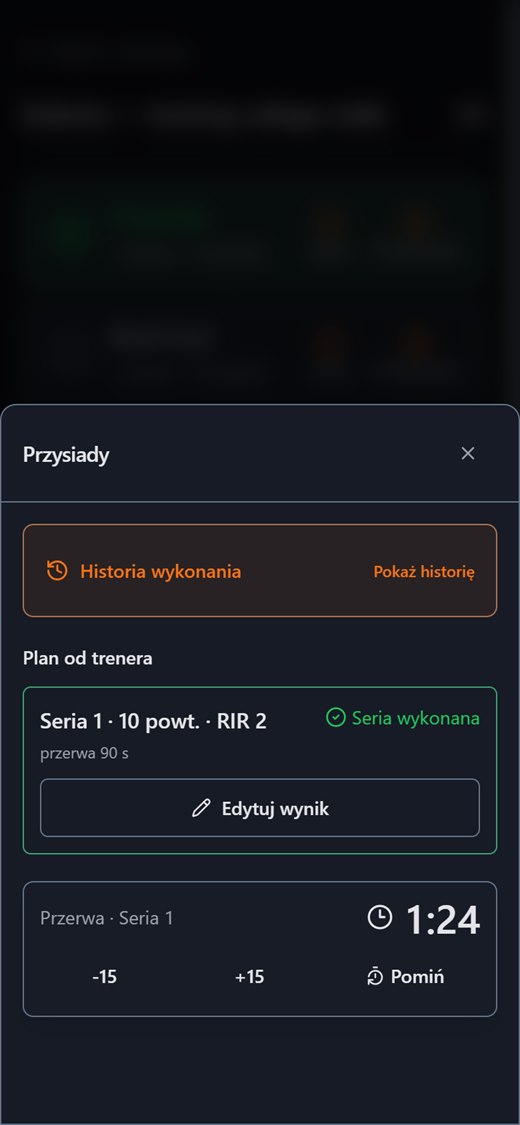
A completed set and a rest timer on the client's phone, with the exercise's execution history

Your own space: plan, workouts and progress

  • A plan for your goal, equipment and number of daysA three-step wizard.
  • Set by set, with a rest timerReps in reserve and a load suggestion.
  • History, strength and body measurementsYou see where you are heading.
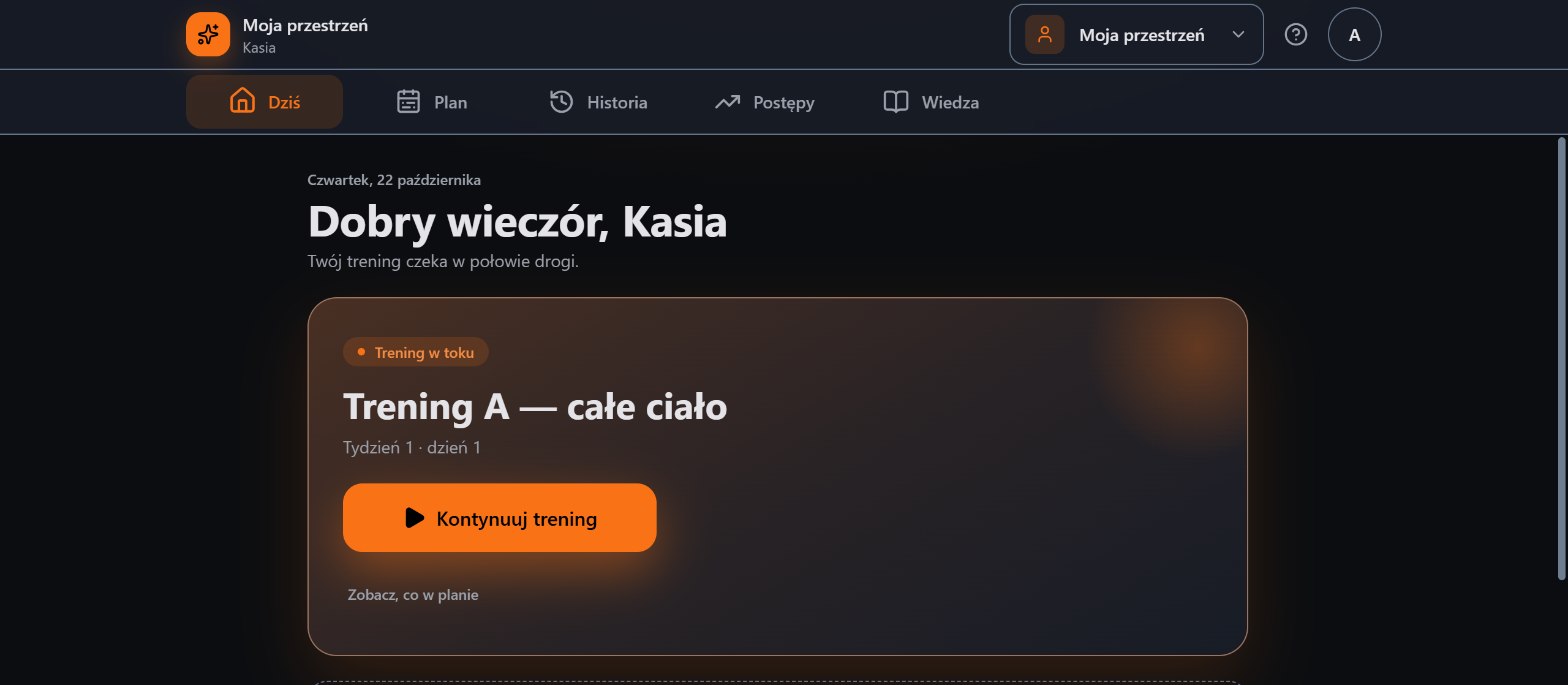
My Space, the Today screen: a workout in progress and a Continue workout button

Problem and solution

From paper slips, messages and files to one order

On the organiser's side a scattered schedule and passes. On the trainee's side a plan in a file and results in a notebook. Create Progress Studio brings it into one place.

  • A pass on a slip of paperA pass in the client's historyThe visit balance and payment status are visible at once.
  • A schedule in messagesA schedule without clashesThe system checks rooms and trainers before a client notices.
  • A plan in a PDFA plan on the client's phoneTicking sets and a rest timer right where the barbell is.
  • Results in a notebookResults come back to the trainerWeight, reps and notes without asking around.
  • Who has paid?Receivables in one viewRevenue, amounts due and costs without stitching spreadsheets.

Create Progress Studio joins these two worlds. The organiser has a tidy schedule and finances, the trainee has the plan on their phone, and progress is visible on both sides.

How it works

One training loop, two sides of the same progress

A finished workout goes back to the trainer. Attendance uses up a visit from the pass. Nobody retypes data from place to place. Click a stage to see it in the real panel.
Today in the panel: a decision queue, passes that need a reaction and the day's timeline with occupancy
You open the panel and know what needs a reactionLow attendance, passes about to run out and today's classes with occupancy. Instead of browsing spreadsheets, you decide.
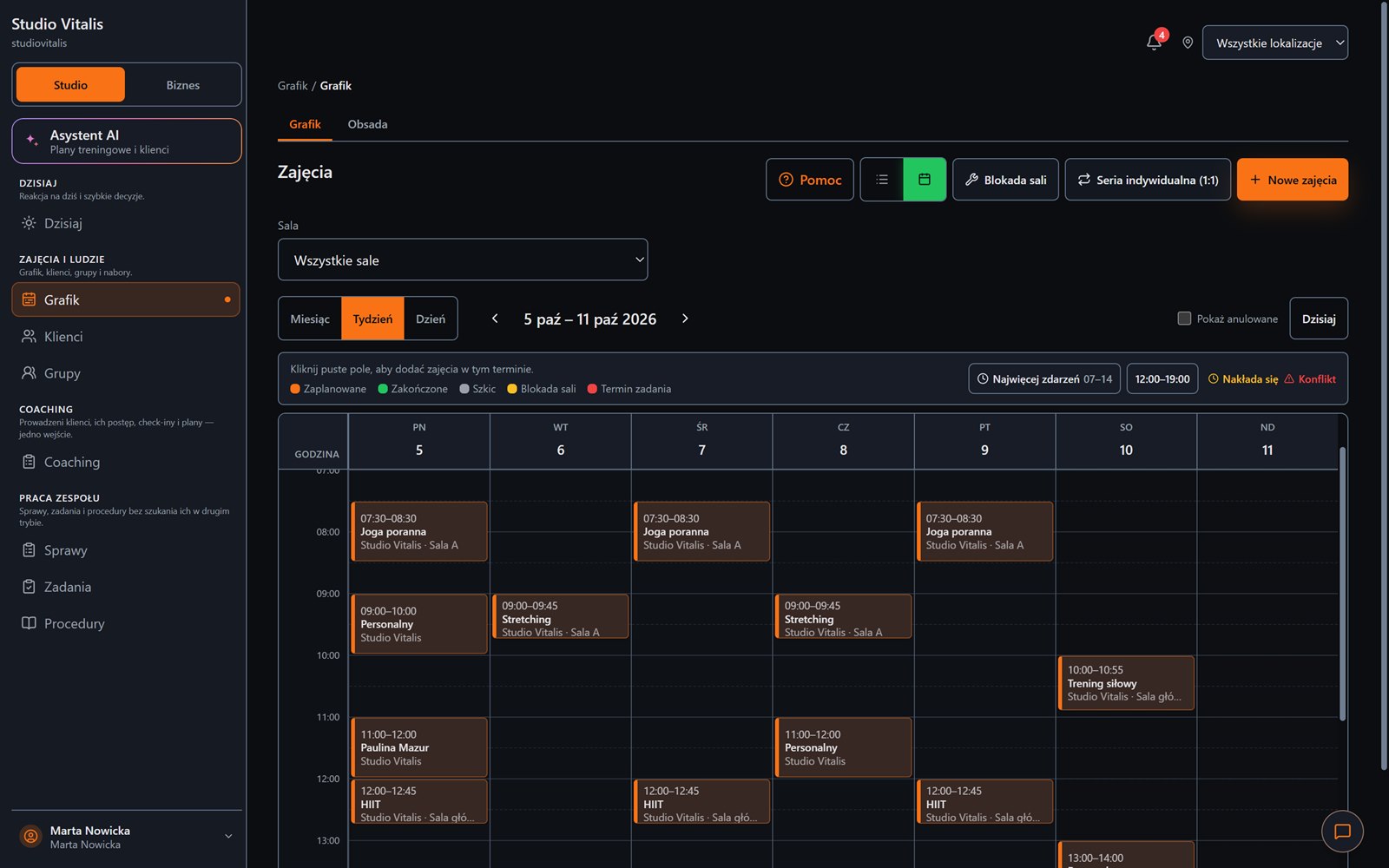
A weekly calendar with classes, rooms and clash information
The whole week on one screenMonth, week and day views, a room filter, series of one-to-one sessions and a clash warning.
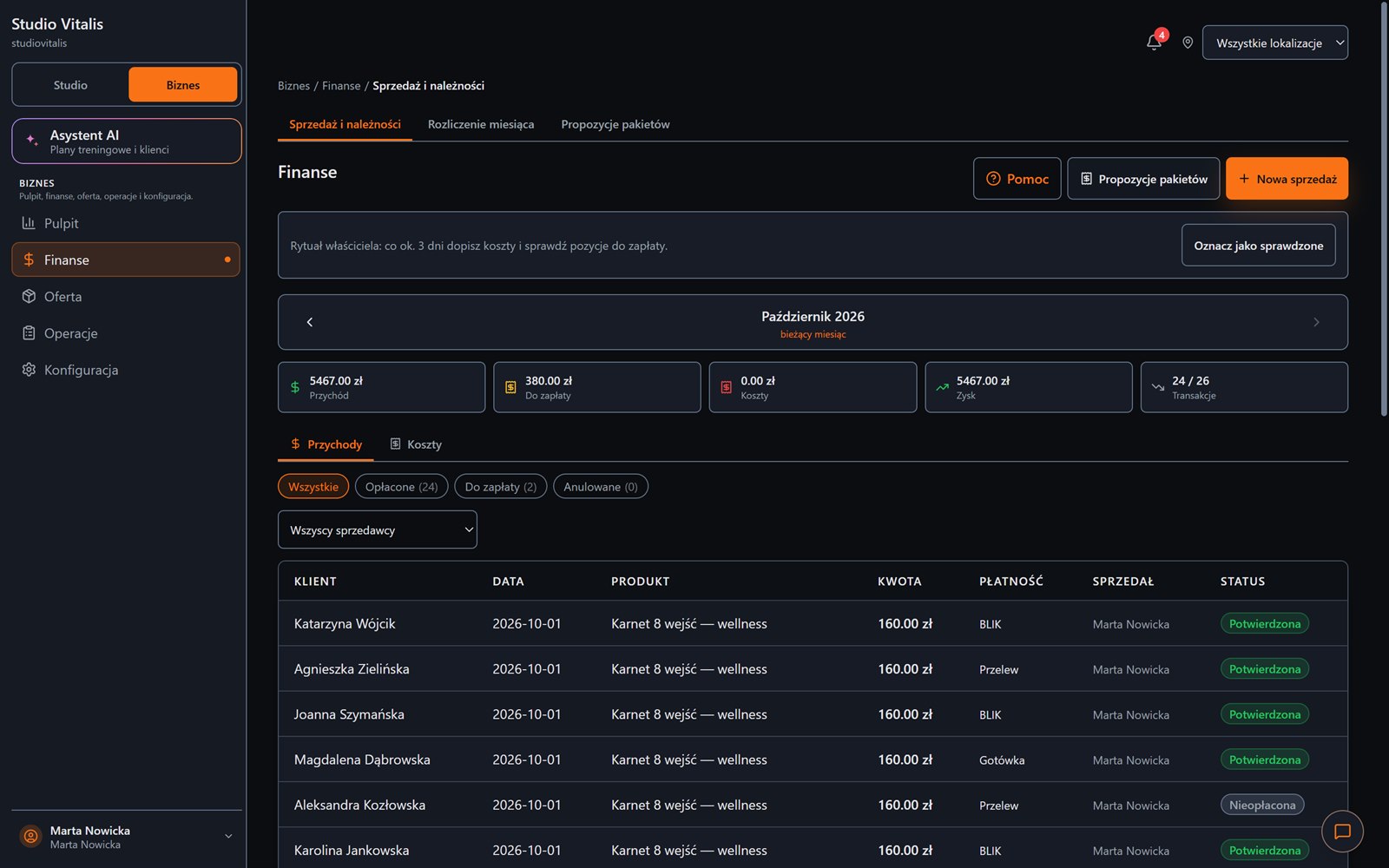
Finance: monthly revenue, amount due, costs, profit and a sales list
Money without stitching spreadsheetsMonthly revenue, receivables and each client's sales with the payment method.
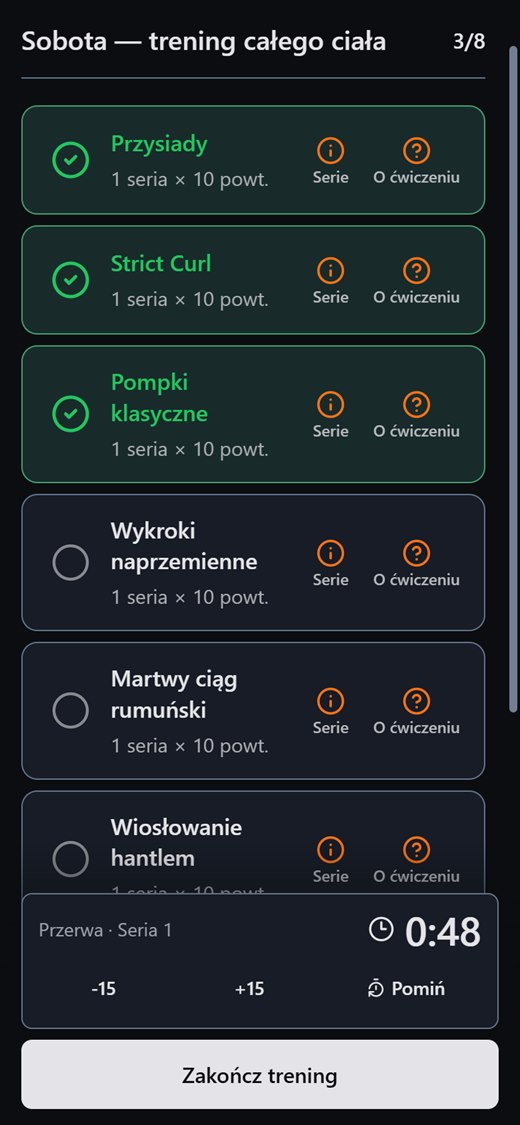
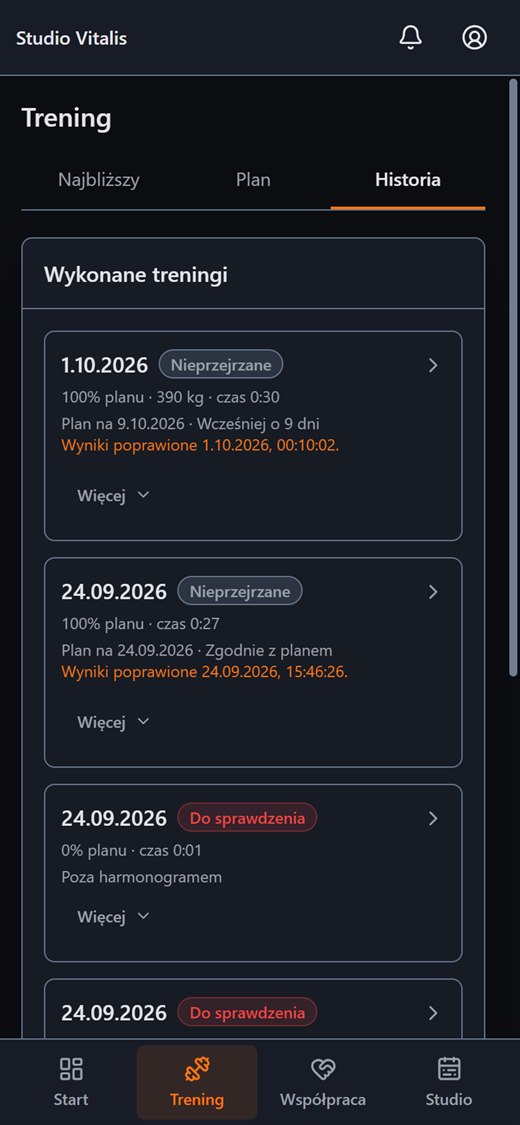
A workout's exercise list: ticked exercises, a 3 of 8 counter and a rest timer A completed set and a rest timer, with the exercise's execution history The history of completed workouts with the date, share of the plan and time
The client trains and you see the resultTicking exercises, sets, a rest timer and history. Execution comes back to the trainer without a message.
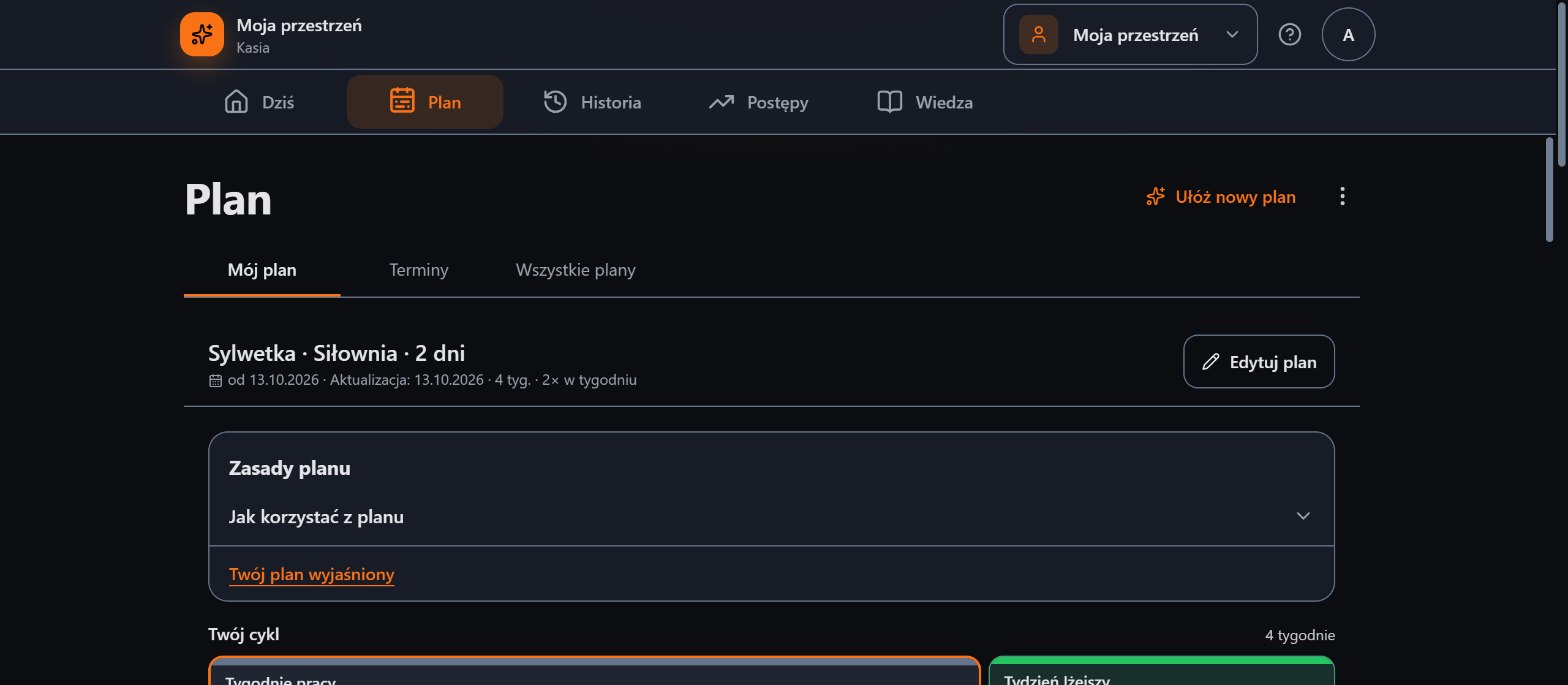
My Space, the Plan screen: a physique plan for the gym, the plan rules and a four-week cycle
Plan, cycle and progress on the trainee's sideA plan with a cycle and a lighter week, workouts set by set, history and measurements in My Space.

The screenshots show demo data. The panel also works on a phone and installs like an app (PWA).

For people who train

Your own space for training: plan, workouts and progress

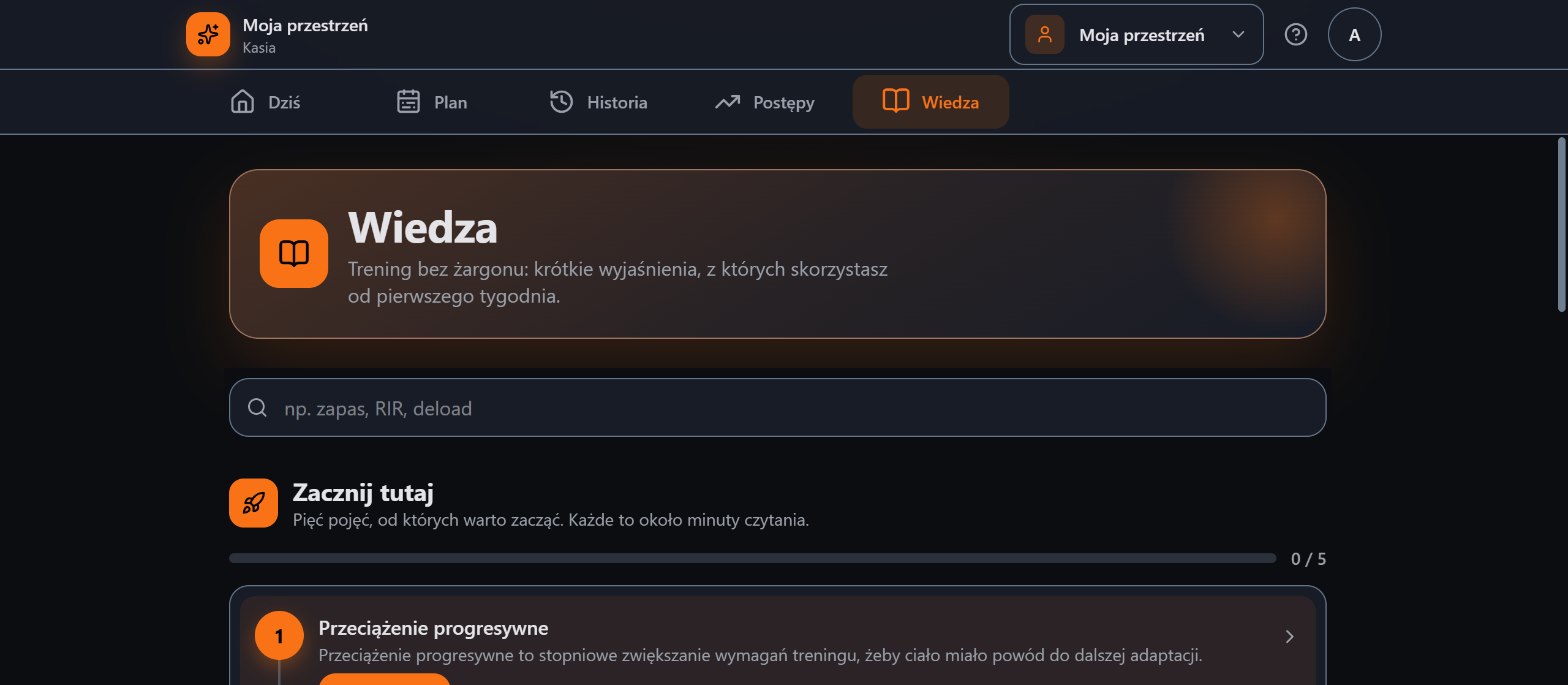
Training on your own or with a trainer? You open My Space. You get a plan built for your goal, equipment and number of days, and then you see what you did and how you are growing.

  • A plan for your goal, equipment and number of daysA three-step wizard. The plan has a cycle with a lighter week.
  • An explanation of why the plan looks like this"Your plan explained" and a "Why?" button next to the plan rules.
  • A workout set by set with a rest timerReps in reserve, a load suggestion and a rating of how hard the workout was.
  • Progress: consistency, strength and bodyYour estimated maximum weight grows with your results. You log body measurements with your consent.

My Space does not require a subscription. Got a trainer or a club? You get an invitation to the client panel from them.
My Space, the Today screen: a workout in progress, Workout A full body, and a Continue workout button
Today
My Space, the Plan screen: a physique plan for the gym, the plan rules and a four-week cycle
Plan and cycle
My Space, the Knowledge screen: a search for terms and a Start here list
Knowledge
A completed set and a rest timer on the client's phone, with the exercise's execution history
Sets and rests
A workout's exercise list: ticked exercises, a 3 of 8 counter and a rest timer
Workout
The history of completed workouts with the date, share of the plan and time
History

Got a trainer or a club?

You train in your trainer's app, on your phone

You always have your trainer's plan with you. You tick off exercises, log sets and count down rests. After the workout everything stays in your history, and your trainer sees it.

  • Today's plan on the first screenThe next workout and a "Start workout" button.
  • Swap an exercise for your trainer's alternativeWhen the equipment is taken, you pick a substitute from the plan.
  • Booking group classesFree places, a waiting list, cancellation.

Progress you can see

Measurements over time, not in memory

You log body weight, waist, hips and arm circumferences whenever you like. The chart shows the trend, so the conversation with your trainer is about direction, not a single result. Your trainer sees the measurements only if you share them.

  • −2.4 kgsince the first measurement
  • 8measurements in 8 weeks

Sample data. This is what the chart looks like in the client panel.

80.0 kg
Body weight · 8 measurements

Features

Everything around training, in one place

Ten areas, from the schedule to the plan on a client's phone. You start with one and switch on the rest when you need it.

See the full overview of features

Organiser's panel

You open the panel and know what needs a reaction

These are current views of the working system with demo data: the decision queue, the weekly schedule and finance.
TodayDecision queue · class timeline · assistant
Today in Create Progress Studio: the decision queue, packs that need a reaction and the day's class timeline with occupancy
You open the panel and know what needs a reactionLow attendance, ending packs and today's classes with occupancy. Instead of browsing spreadsheets, you decide.
ScheduleWeek · rooms · conflicts
The weekly calendar in Create Progress Studio with classes, rooms and conflict information
The whole week on one screenMonth, week and day views, a room filter, one-to-one series and a conflict warning.
FinanceRevenue · to pay · costs
Finance in Create Progress Studio: the month's revenue, the amount to pay, costs, profit and the sales list
Money without piecing together spreadsheetsThe month's revenue, receivables and each client's sales with the form of payment.
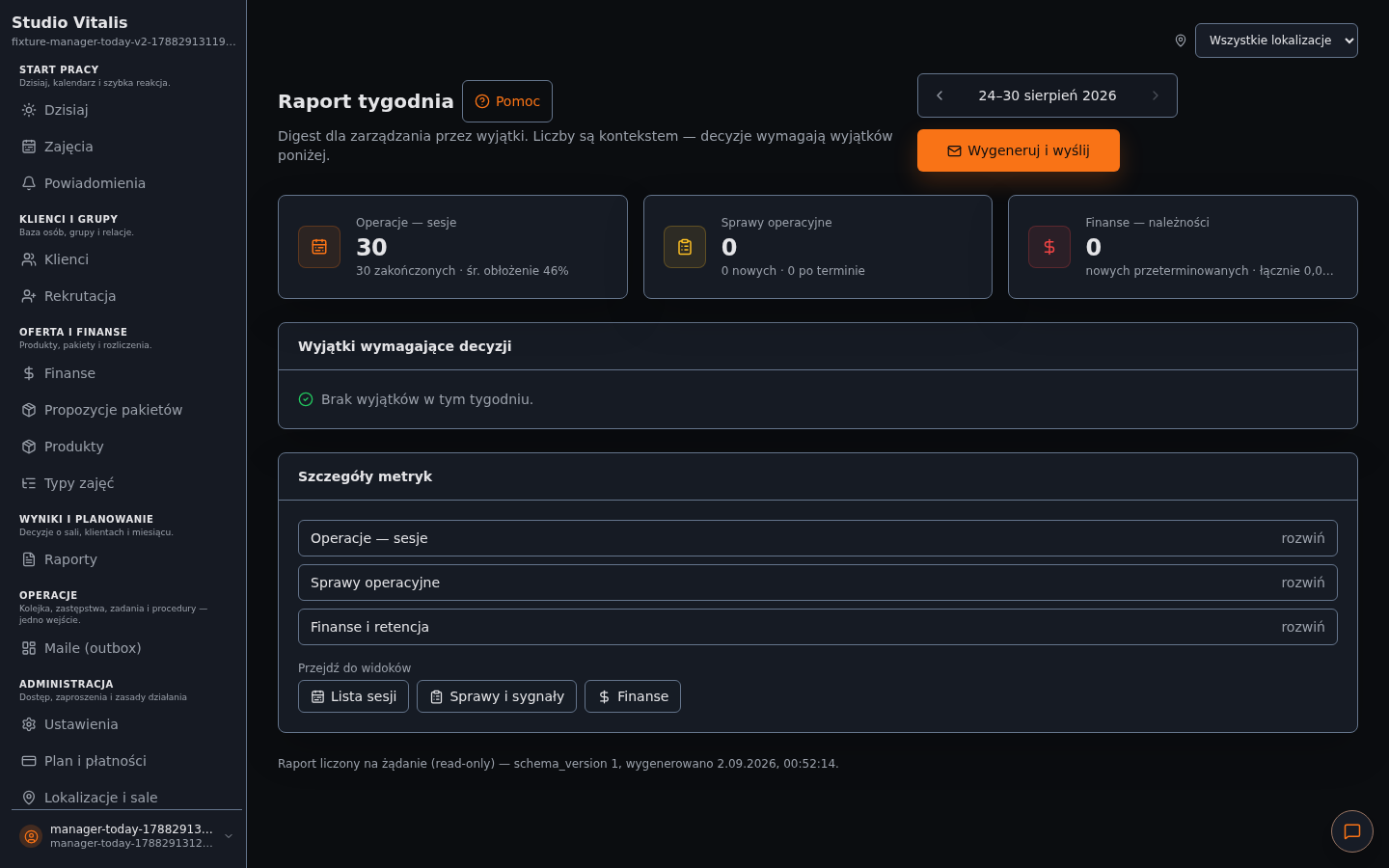
Weekly reportOccupancy · matters · exceptions
The weekly report in Create Progress Studio: sessions, occupancy and exceptions that need a decision
A closed week in numbersOccupancy, matters and receivables from the whole week. You manage by exception.

The screenshots show demo data in the Polish interface. The panel also works on a phone and installs like an app (PWA).

The Without Gravity Szczecin story

From Excel to one panel, as the studio grew

Daniel Harłukiewicz runs Without Gravity Szczecin. When he had two groups, Excel was enough. After moving to Chopina street and launching more groups he needed a system that connects the schedule, clients, passes, attendance and finance.

„What I value most is that I can see exactly who bought what, how many entries they have left, who was in class and how the whole month looks financially.”

Daniel Harłukiewiczowner of Without Gravity Szczecin

Read the whole story
Before

Excel and checking data by hand worked with two groups, but it got harder and harder to handle several or a dozen groups, attendance, packs and payments.

Today

One panel gives a quick picture of passes, entry balances, attendance and finance. Daniel is growing the studio and plans to bring in another trainer to recruit new groups.
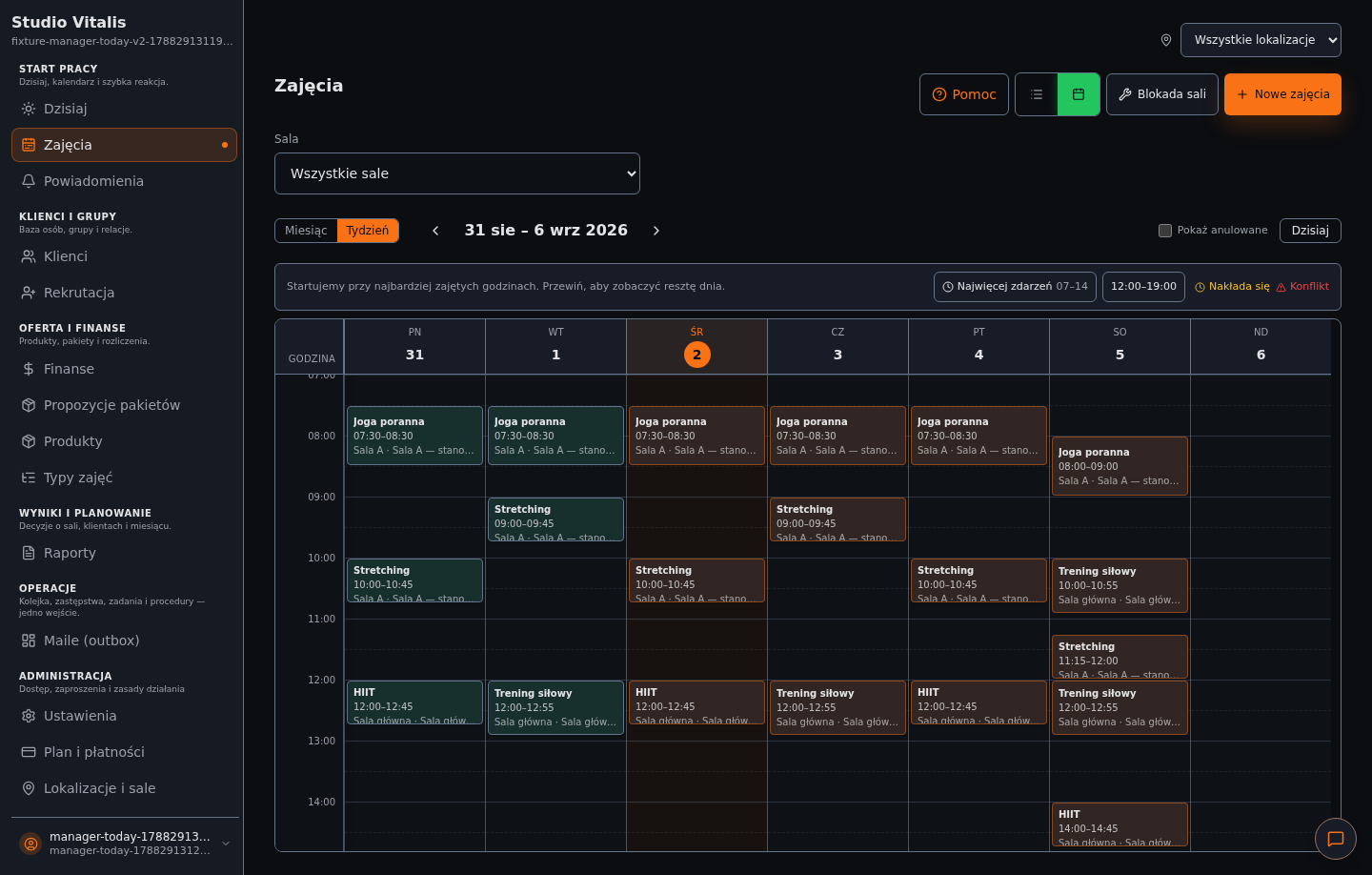
The class calendar in the Create Progress Studio panel with groups and rooms
The class calendar in the panel. A screenshot with demo data.

How to start

A start without stopping your classes

You start with what already works. You add the rest when it is needed.

You run a club, studio, group or clients

01

Create an account

An email and the name of your place. Ready in 2 minutes, no payment card.

02

Add clients and your offer

Your first clients, passes and class packs. A guide leads you through the next steps.

03

Plan classes and plans

Groups with a recurring schedule, or training plans for clients, also from a ready document.

04

Invite your clients

A client signs in to their own panel, sees the plan and starts training. You see the results and Pulse.

You train on your own or with a trainer's plan

01

You have a space or an invitation

Training on your own? You open My Space. Got a trainer or a club? You get an invitation from them.

02

You pick a plan or sign in

In My Space you choose your goal, equipment and number of days. The panel works in the browser and installs like an app.

03

You train and see progress

You tick off sets and count down rests, and the history and measurements show where you are heading.

Pricing

Simple pricing that grows with you

First month free. You pay only when everything works.

First month free

Free

The first month with no charge. Get to know the product, up to 5 users.

0PLN / first month
  • Full access for the first month
  • Up to 5 team users
  • Schedule, bookings and client panel
  • Sales, packs and finance
Try it for free

Business

For large studios, up to 5,000 active clients.

249PLN net / month + VAT
  • Everything in the Pro plan
  • Tasks, cover and procedures for the team
  • A queue of matters that need a reaction
  • Your own studio branding
  • Individual onboarding
Get in touch

For people who train: the client account is part of your club's or trainer's plan. My Space does not require a subscription.

All plans include the client panel. Prices are net; gross with 23% VAT: Pro PLN 60.27, Business PLN 306.27 / month. A VAT invoice for every payment. Online payment: BLIK, payment card or quick transfer, through the payment operator Przelewy24 (PayPro S.A.).

FAQ

Questions from organisers and clients

Concrete answers about getting started, the client panel, training plans, AI, data and leaving paper behind.

What is Create Progress Studio (CP Studio)?
It is an app for running training on both sides. A club, studio or trainer gets a schedule, passes, attendance, finance and plans. A client gets, on their phone, the trainer's plan, a workout step by step with a rest timer, a history of results and measurements. Both sides see the same progress.
Who is CP Studio for?
For clubs, studios and schools (calisthenics, pole dance, yoga, pilates, fitness, boxing, muay thai), for personal trainers and coaches, and for people who train with a plan from a trainer. The person who runs the training creates the account and invites clients to the app.
I am a personal trainer without my own room. Is it for me?
Yes. You can work with clients only: a client database, packs, training plans, check-ins and progress. A group schedule is optional.
What will my client see?
Their own panel on a phone: your plan, the next workout, ticking off exercises and sets with a rest timer, a history of completed workouts and their packs. With the client's consent also body measurements and a progress chart. They do not see the administrative part.
I train. Can I use the app?
Yes, in two ways. If you have a trainer or a club, you get an invitation from them to the client panel. If you train on your own, you open My Space: your own plan, workouts and progress, without a subscription.
What is My Space?
It is a person's own place for training: a plan wizard for your goal, equipment and number of days, workouts set by set with a rest timer, history, strength, measurements and short explanations (Knowledge). The plan is built from rules and templates, not from AI.
Does the client pay for the app?
We do not issue separate invoices to clients. The club or trainer pays the subscription, and the client account is part of their plan. My Space does not require a subscription.
How fast can I start?
You create an account in 2 minutes, no payment card. Setting up (clients, products, groups, classes) usually takes about 30 minutes.
Do I have to retype training plans by hand?
You do not have to. The AI assistant (in beta) reads a plan from a PDF, a Word document, a photo or text and prepares a draft to correct. You review every item before saving. The assistant is available after you accept the updated documents in the panel and switch the feature on.
Can AI change my data without my knowledge?
No. The assistant only prepares a proposal, and a person does the saving after review. We do not pass health data, authentication data or payment card data to the AI features.
Is my clients' health data safe?
Body measurements and health data need the client's consent, which can be withdrawn at any time (the training plan stays visible). Production data is stored in the European Union, and each studio's data is isolated from the others.
Does CP Studio work on a phone?
Yes. The panel is fully responsive and works as a PWA. You can install it on your phone's home screen without an app store.
What is Pulse?
Pulse is analytics for the organiser: the booking plan, quiet clients, packs that are ending and weak days of the week. It tells you whom to ask about an absence and when to add classes.
Is the first month really free?
Yes: full access, up to 5 team users, no payment card. After that you choose Pro (PLN 49 net per month, up to 500 active clients) or Business (PLN 249 net per month, up to 5,000 active clients).
Does CP Studio handle several rooms and locations?
Yes. You can run many locations and rooms, filter the schedule by place, assign capacity and detect conflicts in the calendar.
Does the system help when a trainer is absent?
Yes. CP Studio has a process for availability, cover and a repeated conflict check. Decisions are visible in the operations queue, and communication to participants can be handled in a controlled way.
What integrations does CP Studio offer?
The system works in the browser and as an installable PWA app. It supports data export and email notifications. In the Business plan we can prepare a connection with other tools; the scope depends on your needs.
Can I move from paper or Excel in stages?
Yes. First you set up clients, the offer, groups and classes, and then you switch on further processes such as finance, reports, locations or coaching. Classes can run as usual during the move.

Let's talk

Message us on Instagram, call or send an email. We will help you pick a plan, move your schedule and answer questions about getting started. Customer service is open Monday to Friday, 9:00-17:00 (Polish time).

Seller and customer service office Karol Januszczak PlatyBit ul. Dworskie Ogrody 11/3, 35-214 Rzeszów, Poland VAT ID (NIP) 6871974665 · REGON 389944685

Fewer sheets of paper, more training

Create an account in 2 minutes, no payment card. Your first month is free, and you can move your plans and schedule in stages.